For Service Providers

Repair Shop Management Software

Heavy-duty shop software for diesel repair shops, mobile mechanics, and tire and trailer service providers. Estimates, work orders, technician time, parts inventory, tire tracking, and invoicing in one workflow, connected directly to your fleet customers.

Get Started
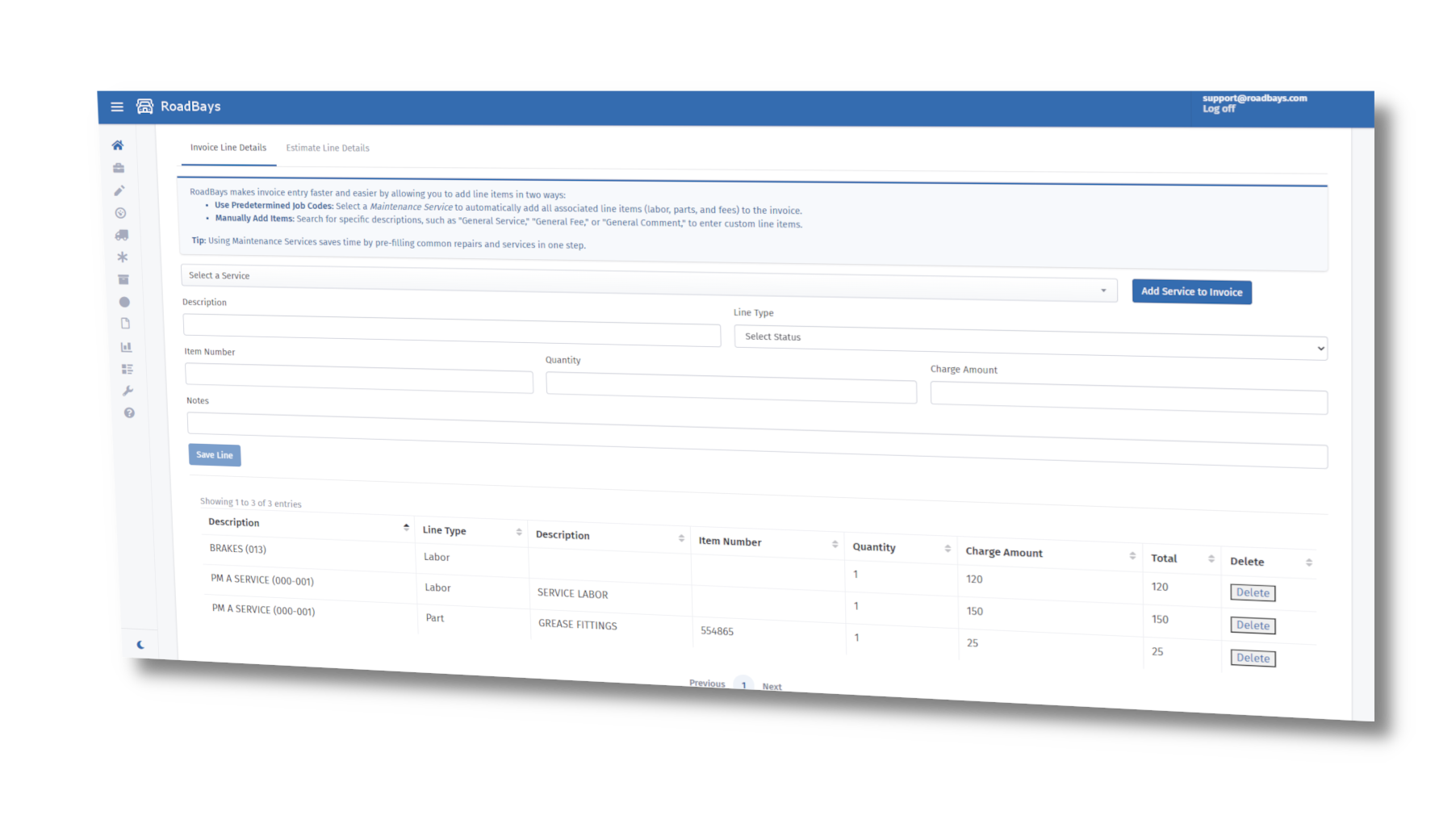
RoadBays shop management software showing an invoice built from a work order
Asset Tracking

Customer Asset & Vehicle Management

Track and manage every vehicle and piece of equipment serviced in your shop. Maintain a full history of repairs, inspections, parts, and costs — all tied to the asset record.

  • Complete repair and service history per asset
  • VIN-based decoding for instant vehicle specs
  • Custom tagging, grouping, and asset search
  • Document and photo attachments per asset
Asset Profile
VIN Decode
Open Jobs
7
Inspections
3
YTD Cost
$12.4k
Recent Service
Status
When
PM A Service
In Progress
Today
Tire Inspection
Pending
2 days
Brake Adjustment
Complete
1 week
Communication

Customer Messaging & Digital Approvals

Keep fleet customers informed throughout the repair — no phone tag, no email chains. Approvals, status updates, and notes all flow through the RoadBays platform.

  • In-platform message threads tied to each job
  • Digital approvals and authorization requests
  • Automated status notifications on job progress
  • Twilio SMS integration for real-time alerts
Job Thread
Approvals
Message
Type
State
Recommend replace leaking airline + clamp kit.
Request
Awaiting
Approved. Attach photos + ETA update.
Reply
Approved
SMS sent automatically on status change.
Automation
Active
Shop Efficiency

Repair Job Templates

Build reusable templates for your most common repairs. Pre-populate labor codes, parts lists, inspection steps, and pricing — then open a new work order in seconds.

  • Reusable templates for common repair types
  • Pre-filled labor codes, parts, and pricing
  • Linked to price tables for instant quotes
  • Reduces intake time and data entry errors
Template Builder
One-Click Create
Steps
12
Labor
2.5h
Parts
6
Line
Type
Auto
Inspect belts / hoses
Checklist
Yes
Replace filter + oil
Service
Yes
Add clamp kit
Part
Yes
Billing

Work Order & Invoicing Software

Build estimates, convert them to work orders with one click, then finalize into a professional invoice — all in one continuous workflow. No re-entry. No lost data.

  • Estimate → Work Order → Invoice in a single flow
  • Technician punch-in: clock into jobs from mobile
  • Separate wrench time, travel time & wait time
  • PDF export and email-ready invoice format
  • Tax, labor, and parts calculations auto-applied
  • Stripe payment integration for fast collection
Billing Workbench
Get Paid Faster
Estimates
5
Work Orders
8
Invoices
11
Flow
Status
Action
EST → WO
Convert
1 Click
WO → INV
Finalize
Review
INV → Pay
Collect
Stripe
Tire Service

Tire Management & Tire Service Tracking

Sell and document tire work with the same rigor as any other repair. Each customer unit carries an axle configuration, so your techs install, rotate, and read tires by position, and every action lands in the unit's history and on the invoice.

  • Axle configurations for 4, 6, 8, and 10 wheel positions on customer units
  • Install tires from your on-hand tire inventory by serial number or TIN
  • Tread depth and pressure readings captured at install and at every service
  • Guided rotation patterns with a preview before the work order is executed
  • Tire activity log per unit: installs, removals, rotations, and readings
  • Pulled tires return to inventory automatically; tire models carry life-expectancy mileage
Tire Management
Rotate Tires
Axle Config
6x4
Tires On Hand
38
Low Tread
2
Position
Tread
Activity
LF – Steer
12/32
Reading
RRO – Drive
5/32
Rotated
LRI – Drive
14/32
Installed
Records

Service History & Repair Records

Every completed job is stored in a searchable, exportable record. Reference past work for warranty verification, recurring issues, or long-term asset planning.

  • Indexed records searchable by unit, date, or repair type
  • Exportable logs for reporting or customer delivery
  • Warranty claim linkage and coverage verification
  • Tied to fleet case records for complete visibility
Service Log
Export
Job
Status
Date
DOT Inspection
Complete
Feb 12
PM B Service
Complete
Jan 28
Air Leak Repair
Warranty
Jan 03
Complete Platform

Parts Inventory, Labor Tracking & All-in-One Shop Management

From the front desk to the repair bay, RoadBays gives your shop everything needed to manage jobs efficiently and deliver exceptional service.

  • Accept digital work requests and quotes from fleet customers
  • Parts inventory module with bins, price tables & reorder alerts
  • Serialized tire inventory with axle configs, rotations & tread logs
  • Technician punch-in for labor tracking on mobile
  • Wrench time vs. travel time separation for accurate billing
  • Real-time job status dashboards for shop visibility
  • Parts catalog linked directly to work orders
  • Create and email branded, professional invoices
  • Manage internal and mobile technician assignments
  • Customer-specific and fleet pricing tiers
  • Audit trail and full job documentation
  • Service history linked to fleet cases and assets
  • Exportable billing summaries and reports
Service Providers

What Service Providers Are Saying

"Our shop runs smoother than ever — RoadBays connects everything from estimate to closeout without any manual re-entry."

Megan H.
Midwest Diesel Repair

"Technicians love how simple it is to punch in, update jobs, and attach photos. No more chasing paper timesheets."

Travis S.
FleetFix Services

"Our customers get better updates, faster approvals, and we invoice quicker. It's a win on both sides of the transaction."

Lori R.
OnSite Fleet Care
FAQ

Repair Shop Management Software FAQ

Is RoadBays a heavy-duty truck repair shop software?

Yes. RoadBays is built for commercial and heavy-duty service: diesel repair shops, mobile mechanics, tire and trailer shops, and dealer service departments that work on fleet customers. It handles estimates, work orders, technician time, parts, tires, and invoicing for trucks, trailers, and equipment.

How do estimates become work orders and invoices?

Build the estimate once. The fleet customer approves it digitally, RoadBays converts it to a work order with one click, technicians punch in and add parts as they go, and the finished work order finalizes into an invoice. Nothing is re-typed between stages.

Can technicians clock into jobs from their phones?

Yes. Techs punch into a specific work order from a mobile device. RoadBays separates wrench time, travel time, and wait time so labor billing is accurate and payroll has a clean record without paper timesheets.

Does RoadBays track parts inventory?

Yes. The inventory module tracks stock levels, bins and locations, reorder alerts, and usage history. Parts are added directly to work orders, and customer-specific price tables apply markups and negotiated rates automatically. Tires are tracked as serialized inventory that can be installed on customer units.

How do my fleet customers send me work?

Fleets on RoadBays dispatch cases to shops in their preferred network. You receive the request with unit details, fault codes, photos, and priority, respond with an estimate, and keep the customer updated through in-platform messaging and automatic SMS notifications.
Get Started

Ready to Modernize Your Repair Shop?

Join RoadBays and streamline your workflow from intake to invoice — no more spreadsheets or paper trails.

Get Started Now